Moving to Southborough MA with a multi-monitor setup, servers, and thousands of dollars in sensitive electronics? The thought of packing it all safely can feel overwhelming.
Tech professionals relocating to the 495 tech corridor face unique challenges. Your home office isn't just furniture. It's your livelihood, and one wrong packing decision could mean damaged equipment and downtime that gets pricey.
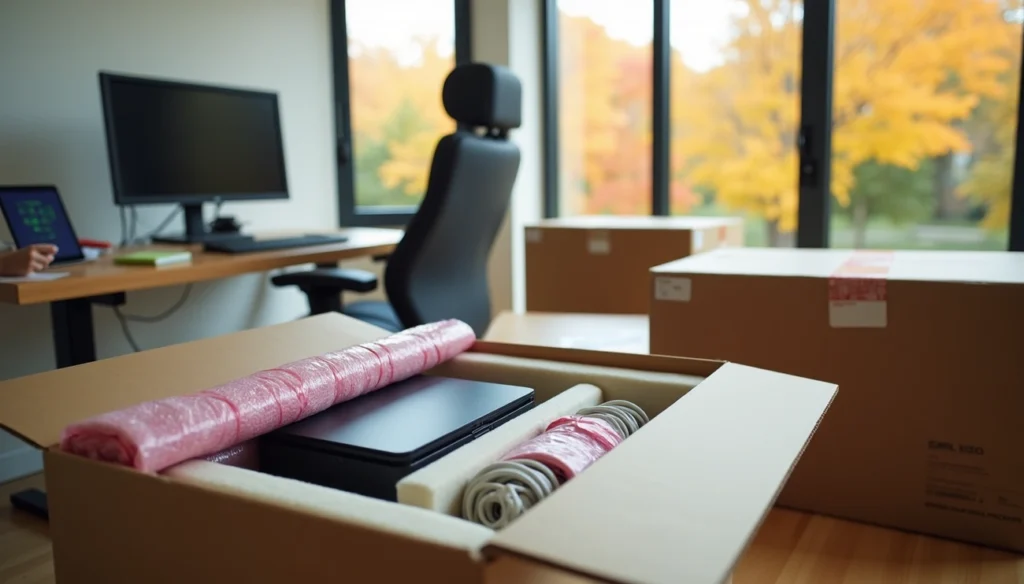
We've created this complete guide for professionals like you who are living in Southborough or planning the move. You'll learn anti-static wrapping techniques and how to work with professional movers Southborough. We'll walk you through the process of packing electronics for move with precision.
Pre-Move Planning for Tech Professionals in Southborough
Southborough's 495 Tech Corridor Location
Southborough sits at the heart of Massachusetts' 495 tech corridor, a region that solidified its position as a high-tech hub housing computer storage companies, networking firms, biotech organizations and software developers. The 495 Technology Center offers 310,000 square feet of development space located just half a mile from the Interstate 495 interchange and three miles north of the Massachusetts Turnpike. Tech professionals who relocate here need to understand this tech ecosystem. It provides context for why strong infrastructure and minimal downtime matter so much when you live in Southborough.
The corridor's concentration of technology employers means many incoming residents work hybrid schedules or run home-based operations that serve major firms in the area. Then your move planning must account for both physical logistics and digital connectivity requirements from day one.
Move Timing to Minimize Work Disruption
Schedule your relocation during evenings, weekends or holiday breaks to reduce disruptions during working hours. To cite an instance, planning around a long weekend or company shutdown period allows you to handle the physical move without sacrificing billable hours or missing critical meetings.
Start planning at least six months to a year before your move date. This advance timeline lets you create a detailed schedule that covers every phase from lease termination to IT setup at your new location. If a complete shutdown proves unavoidable, think about a phased approach where you relocate different work zones at different times to maintain some operational functionality.
Professional movers Southborough who understand tech industry demands can streamline coordination. Back up all data before any equipment gets moved, and involve your IT systems early for coordinated disconnection and reconnection.
Utilities and Internet Setup Before Arrival
Schedule internet service two to three weeks before your move date. Southborough providers include Spectrum (speeds up to 1 Gbps starting at $30/month), AT&T Internet Air offering 5G fixed wireless, Verizon Fios reaching about 99% of Southborough with speeds up to 2 Gbps, and EarthLink Fiber with speeds up to 5 Gbps available to 94.61% of the city.
Contact Massachusetts utility providers two to four weeks before moving. Major electricity and gas companies that serve the area include Eversource, National Grid and Unitil. Confirm whether your new property requires professional installation or supports self-setup, and schedule technician appointments early during peak moving season.
Test internet speed and verify all utilities function on move-in day. This proactive approach prevents work disruptions once you settle into your new home office.
The Home Office Inventory
Creating a Complete Equipment List
A detailed inventory forms your foundation to track expensive electronics during relocation. Document each item by room or function and include details such as make, model, serial number, purchase date, and estimated value. Categorizing by function helps identify duplicate equipment and prioritize unpacking at your new location.
Assign unique identifiers to each piece of equipment using alphanumeric combinations that make items easy to recognize. This system simplifies communication with professional movers Southborough about specific devices and assists in locating equipment if items become misplaced during transit.
Systematic Wire Labeling for Easy Reconnection
Mark each cable and its corresponding port with adhesive labels using a Color-Coded System before you disconnect anything. Apply colored stickers to both ends of each cable and matching stickers next to the appropriate inputs on your devices. To name just one example, place a green dot on your mouse cable and a corresponding green dot next to the mouse input port.
Label both ends of network, patch, and power cables using printed, waterproof labels that are clearly legible. This prevents confusion during setup at your new home office. Write down step-by-step reconnection instructions and keep them inside the equipment box.
Component Breakdown and Documentation
Photograph your complete setup from multiple angles before disassembly[113]. These images serve as visual references when you reassemble equipment in your new space. Document pre-existing damage by creating a dedicated section on your inventory list that notes any scratches, dents, or malfunctions. This documentation protects you if insurance claims become necessary.
Backing Up All Data Before Packing
Follow the 3-2-1 backup rule: maintain three copies of your data, store copies on two different media types, and keep one copy offsite. Test backup integrity by running complete system restores on non-critical machines before the move. Document configuration files, IP addresses, DNS settings, and software licensing information separately. These elements often get overlooked but prove critical when you reactivate systems after relocation.
High-Value Specialized Packing for Electronics
Using Anti-Static Sheets for Sensitive Equipment
Specialized materials protect electronics from static electricity. Anti-static sheets and covers act as barriers that prevent electrostatic discharge. This discharge can damage components with as little as 30 volts. Studies show up to 33% of electrical product loss stems from static buildup. Cover items with anti-static covers first or seal them in computer bags to protect from static electricity and dust. Then wrap with bubble cushion. Biodegradable packing peanuts provide anti-static void fill and prevent damage during transport. Pink anti-static foam features specialized polyurethane with anti-static materials. It's designed for electronics and offers affordable insulation.
Custom Foam Structures for Fragile Tech
Custom Foam inserts provide shock absorption, moisture resistance and vibration dampening. Polyurethane open-cell foam works best for smaller sensitive products like circuit boards and CPUs. Cross-linked polyethylene closed-cell foam suits larger bulky items like computers due to its structural rigidity. Custom foam isolates each component and prevents internal collisions during transit. These inserts keep products arranged while providing 360-degree protection against impacts.
Packing Monitors and Screens Safely
Wrap monitors in anti-static bubble wrap with 3 inches of padding on all sides. Remove detachable stands and pack them separately to reduce damage risk. Position monitors upright in boxes, never flat. Horizontal placement creates internal stress that damages LCD panels. Medium TV moving boxes provide adjustable sizing for monitors between 27 and 40 inches. The double-box method places the wrapped monitor in a smaller box, then inside a larger one with additional padding between them. Fill void spaces with packing peanuts or crumpled paper so monitors cannot shift when you shake the boxes. Over 30% of monitor damage occurs from pressure during improper stacking.
Securing Laptops and Mobile Devices
Wrap laptops in anti-static bubble wrap and place them in padded cases. Transport laptops in your personal vehicle rather than moving trucks. This eliminates vibration and temperature fluctuation risks. Never pack laptops flat at the bottom of heavy boxes. Use sturdy double-walled boxes with at least two inches of padding for shipping. Packing foam or anti-static bubble wrap works well.
Temperature-Sensitive Equipment Considerations
Electronics suffer damage when exposed to temperature extremes. Materials expand and contract, causing component failure. Climate-controlled environments maintain temperatures between 55°F and 85°F with humidity around 50-55%. Internal condensation forms when temperatures fluctuate and leads to corrosion and device failure. Store electronics off floors and use thermal wraps during transport. Allow devices to adjust to indoor temperature for at least two to three hours before powering them on. Wrap devices in thermal blankets followed by multiple layers of bubble wrap for insulation. When working with professional movers Southborough, confirm they provide climate-controlled transport for sensitive equipment.
Upgrading your lifestyle to Southborough's quiet acreage? Reach out to Lifetime Moving Co. today to lock in your professional relocation plan. Let our trained local teams manage every detail of your premium move!
Security and Tracking During Your Move
Minimizing Downtime for Hybrid Workers
Remote work capabilities keep operations running when physical offices relocate. Schedule your move during weekends or after business hours. Clients who opt for off-hours relocations report up to 50% less productivity loss compared to standard business hour moves. A phased approach where you relocate different work zones at separate times maintains partial functionality throughout the transition. So test your remote infrastructure including VPNs and cloud platforms well before moving day.
Keeping Critical Items Available
Transport laptops, external drives and authentication devices in your personal vehicle rather than the moving truck. This eliminates risks associated with mixed shipments and provides immediate access to the tools you need at your new location.
Working with Professional Movers Southborough
Licensed professional movers Southborough track and monitor your belongings throughout transit. Gentle Giant provides upfront estimates with no hidden fees and follows all Massachusetts moving regulations. Verify movers carry proper licensing and insurance before signing contracts.
Insurance and Documentation to Protect High-Value Tech
Interstate movers must offer two liability options: Full Value Protection covers complete replacement value of lost or damaged items, while Released Value Protection costs nothing but provides only 60 cents per pound per article. A 25-pound monitor would receive just $15 under Released Value, so tech professionals should opt for Full Value Protection. Items valued over $100 per pound require written declaration on shipping documents. You have nine months from delivery to file claims.
Conclusion
Moving to Southborough MA with valuable tech equipment can be stress-free. Proper planning helps. Detailed inventory systems and specialized packing techniques protect your whole home office setup during relocation. Note that working with experienced professionals who understand electronics handling makes all the difference. Your equipment represents both your livelihood and major investment, so prioritize quality protection over shortcuts.
Upgrading your lifestyle to Southborough's quiet acreage? Contact Lifetime Moving Co. today to lock in your professional relocation plan. Let our trained local teams manage every detail of your premium move!
Key Takeaways
Moving tech equipment to Southborough requires strategic planning and specialized techniques to protect valuable electronics and minimize work disruption.
• Schedule your move during weekends or holidays to reduce work disruption, and set up internet service 2-3 weeks before arrival • Create detailed equipment inventories with serial numbers and use color-coded wire labeling for easy reconnection • Use anti-static sheets and custom foam padding for electronics, and transport laptops personally rather than in moving trucks • Choose Full Value Protection insurance over basic coverage, as it provides complete replacement value for high-tech equipment • Work with licensed professional movers who offer climate-controlled transport and understand electronics handling requirements
Tech professionals relocating to the 495 corridor need more than standard moving services. Your home office equipment represents both your livelihood and significant investment, making proper protection essential for a successful transition to Southborough's thriving tech community.
FAQs
Q1. What should I avoid packing when moving with professional movers? Never pack hazardous materials, perishable food, important documents, or irreplaceable items like laptops and authentication devices. Transport these critical tech items in your personal vehicle to maintain immediate access and eliminate risks associated with mixed shipments during the move.
Q2. How far in advance should tech professionals start planning their move to Southborough? Start planning at least six months to a year before your move date. This timeline allows you to create a detailed schedule covering everything from lease termination to IT setup, schedule internet service 2-3 weeks before arrival, and coordinate with professional movers who understand electronics handling requirements.
Q3. What makes packing electronics the most challenging part of moving? Electronics require specialized packing techniques including anti-static sheets, custom foam padding, and climate-controlled transport. The complexity comes from protecting sensitive components from static discharge (as little as 30 volts can cause damage), preventing temperature fluctuations, and maintaining detailed wire labeling systems for easy reconnection.
Q4. How can I pack my tech equipment like a professional? Create a complete equipment inventory with serial numbers, photograph your setup before disassembly, and use color-coded wire labeling. Wrap electronics in anti-static bubble wrap with 3 inches of padding, pack monitors upright (never flat), and back up all data following the 3-2-1 rule before packing anything.
Q5. Is Southborough a good location for tech professionals relocating with families? Yes, Southborough sits at the heart of the 495 tech corridor with excellent schools and safe neighborhoods. The town offers easy access to Mass Pike and Route 495, making it ideal for tech professionals. Nearby alternatives include Hopkinton, Northborough, and Westborough, all within 30 minutes and offering good schools and family-friendly environments.